Launch Smartlink C V4 vs Smartlink C V2

Launch X431 released new generation Smartlink C V4 VCI. What’s the difference between Smartlink C V4 and Smartlink C V2?


Check the table comparison below:


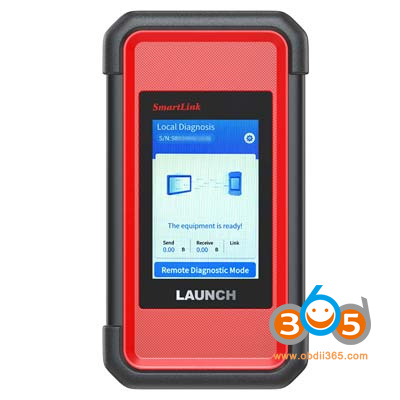
SmartLink C V2

launch smartlink c v2

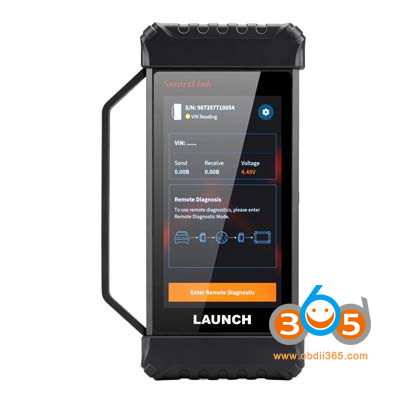
SmartLink C V4

launch smartlink c v4

CPUSingle-core 528MHzdual-core 1.7G
Working VoltageDC 9V ~ 36VDC 8V ~ 36V
Screen3.95 inches, 320*4805 inches, 1280*720
RAM256M1G
Storage8G8G
CommunicationLocal Diagnosis: WIFI/BT/USB
SmartLink Remote Diagnosis: Wi‑Fi / Wired
Local Diagnosis: WIFI/BT/USB
SmartLink Remote Diagnosis: Wi‑Fi / Wired
WIFIWIFI 5WIFI 6
BluetoothBT4.2BT5.0
I/ODB15 male, USB-B, RJ45, DC INDB15 female, USB-B, RJ45, DC IN
Working Temperature0℃ ~ 50℃0℃ ~ 50℃
Size200*47*110mm187.6*32.8*106mm
Weight0.55kg0.35kg


The Launch Smartlink C V4 VCI comes with upgrades to both its software and hardware.


launch smartlink C V4 vs smartlink C v2

1. Hardware Performance Upgrade

Connector Performance Leap: The connector’s CPU has been upgraded from a single-core to a dual-core processor, with the clock speed increased to 1.7 GHz. The RAM has been expanded from 256 MB to 1 GB, significantly accelerating computational response speed and enabling more efficient command execution. The CAN bus has been upgraded to 4 channels of CAN FD, delivering comprehensive improvements in communication bandwidth and transmission capacity to support diagnostic requirements for a wider range of newer vehicle models.

2. Diagnostic Functionality Upgrade

Graphical Diagnostic Display: Supports graphical visualization of special functions, topology maps, and data streams. Data trends are intuitively visible, enabling more precise and efficient fault localization and eliminating the need for cumbersome text-only interpretation.

High-Speed Scanning: Utilizes multi-channel synchronous scanning technology to process diagnostic tasks in parallel. Compared to traditional single-channel scanning, this significantly improves efficiency, delivering faster diagnostic speed and reducing repair time.

AI-Powered Fault Remediation: Visually displays fault points and provides targeted, highly feasible optimization solutions.

Comments

Popular posts from this blog

Install Launch X431 SmartLink C J2534 Driver

Launch X431 SmartLink C can be used as a J2534 PassThru device, working together with the PC installed with the OEM diagnostic software to perform the J2534 reprogramming.   Obdii365   shows where to download and how to install the Passthru SAE J2534 driver for LAUNCH X431 Smart Link C passthru adapter (for   PAD VII ) If you have Smartbox 3.0 (old PAD V and   X431 Pro5 ), download J2534 passthru   in the previous post .     How to Download Launch X431 SmartLink C J2534 passthru driver?   Same as smartbox 3.0, you need both installation programs (setup driver and PC tool for update).   1. Download PC tool for update (update smartlink c firmware) Visit   https://en.cnlaunch.com/ Select Products tab->X-431 PAD VII Pull down product information and find   Download Download   Smartlink J2534.zip Install Launch J2534 PC tool Run LAUNCH J2534 program on desktop. Now you can check Smartlink adapter version and update firmware 2. Do...

Will Lauch X-PROG3 Work with Diagzone, Xdiag or Prodiag?

Does Launch X431 X-prog3 work with xdiag, diagzone or prodiag activations?  Diagzone compatible xprog3? Is it working with prodiag? Will it work with xdiag? These are frequently asked questions of   Launch X-PROG3   (also called GIII) programmers. X-prog3 is compatible with Multiple X-431 Series   X-431 V ,  X-431 V+ ,   X431 Pro5 ,  X431 ProS ,   X431 Pro3s+ ,  X-431 PAD V ,  X-431 PAD VII , X-DIAG Pro3 diagnostic tablets. This programmer works not only for programming keys, but for working with ECU and gearbox. But when comes to key programming you need to know what you doing there is not too much info in the Diagzone/Prodiag software.   What worked and failed? Here are user reviews. *You are at your risk. We don’t provide technical support to 3rd party software.   Prodiag: Yes It works with prodiag. Prodiag provides usb connection with virtual comport. It works fine to read ECU and gearbox clone. For example, VAG DQ200 gearb...

Launch X431 V+ or PIWIS-III for Porsche Diagnosis?

I have the Launch X431 V+ Pros Mini which I purchased new from obdii365 for $1079. I also have a PIWIS III clone V38.90 that i purchased from another website for $1429. I purchased the Launch X431 V+ with the intent of using it to flash a used control module for my car. When I discovered that the Launch X431 V+ could not do that I purchased a PIWIS III clone with the intention of selling the Launch X431 V+ but I have not got around to selling it yet because it is so much easier to use then the PIWIS III.Here is what I have done so far with each one. Launch X431 V+ : Cleared all the fault codes stored in the car. Activated the Aux setting in PCM (PCM/CDR) I had to add an aux cable to the PCM to make use of this one. Changed the number of flashes for one touch turn signal from 3 to 5 (Front-end Electronics) Activated Comfort entry windows up/down via keyfob (Front-end Electronics) Changed the speed when the doors auto lock, 3 mph to 20 mph (Front-end electronics) Changed the speed when...