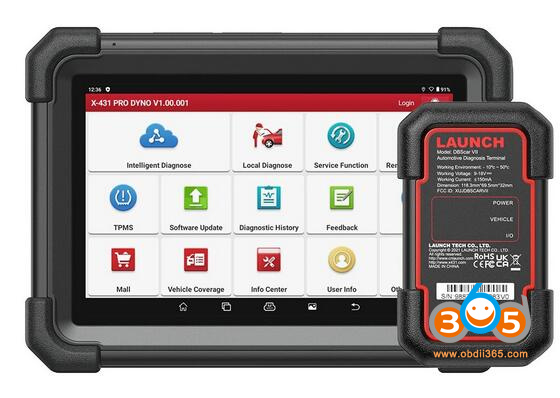
Launch X431 Pro3 APEX and Pro Dyno Comparison

What’s the difference between Launch X431 Pro3 APEX and Launch X431 Pro Dyno diagnostic scanners?

Check a table comparison below:
 

ItemLaunch X431 Pro DynoLaunch X431 PRO3 APEX
Imagelaunch x431 pro dynolaunch x431 pro3 apex
Screen8 inch10.1 inch
Resolution1280 * 8001280 * 800
Operating systemAndroid 10Android 10.0
CPU Processor2.0GHz 4-core2.0GHz 4-core
ROM4GB4GB
RAM64GB64GB
Battery Capacity6300mAh 7.6V6300mAh 7.6V
CameraRear 8 Million PixelsRear 8 Million Pixels
Wi-Fi Network2.4 & 5 GHz2.4GHz/5GHz
VCIDBScar VIIDBScar VII
Language24 languages24 Languages
Car brand coverage100+ brands150+ brands
CAN FD protocolYesYes
DoIP protocolYesYes
FCA AutoauthYesYes
AutoVINYesYes
Full system diagnosticYesYes
Bi-Directional ControlYesYes
ECU CodingYesYes
Service Function3737
VAG Guided FunctionYesYes
ECU ProgrammingNoNo
Topology mappingNoYes
Immobilizer CompatibilityX-prog3X-prog3
Truck diagnosticsNoYes, works with HD III
TPMSYes, with TSGUN/i-TPMSYes, with TSGUN/i-TPMS
Battery TestWith BST-360 battery testerWith BST-360 battery tester
VideoscopeWith VSP-600 videoscopeWith VSP-600 videoscope
ADASYes, need ADAS kitYes, need ADAS kit
Sensor BoxYes with S2-2 sensorboxYes with S2-2 sensorbox
OscilloscopeYes with O2-1 Scopebox OscilloscopeYes with O2-2 Scopebox Oscilloscope
WiFi printerYesYes
Update2 Years Free Update2 Years Free Update
Price in obdii365$799$979

In sum:

Pro Dyno and Pro3 APEX share similar diagnostic and coding functions.

Pro3 APEX supports Topology mapping, Pro Dyno does not.

Pro3 APEX is compatible with HDIII truck module, Pro Dyno is for 12V cars only.

Comments

Popular posts from this blog

Install Launch X431 SmartLink C J2534 Driver

Launch X431 SmartLink C can be used as a J2534 PassThru device, working together with the PC installed with the OEM diagnostic software to perform the J2534 reprogramming.   Obdii365   shows where to download and how to install the Passthru SAE J2534 driver for LAUNCH X431 Smart Link C passthru adapter (for   PAD VII ) If you have Smartbox 3.0 (old PAD V and   X431 Pro5 ), download J2534 passthru   in the previous post .     How to Download Launch X431 SmartLink C J2534 passthru driver?   Same as smartbox 3.0, you need both installation programs (setup driver and PC tool for update).   1. Download PC tool for update (update smartlink c firmware) Visit   https://en.cnlaunch.com/ Select Products tab->X-431 PAD VII Pull down product information and find   Download Download   Smartlink J2534.zip Install Launch J2534 PC tool Run LAUNCH J2534 program on desktop. Now you can check Smartlink adapter version and update firmware 2. Do...

Will Lauch X-PROG3 Work with Diagzone, Xdiag or Prodiag?

Does Launch X431 X-prog3 work with xdiag, diagzone or prodiag activations?  Diagzone compatible xprog3? Is it working with prodiag? Will it work with xdiag? These are frequently asked questions of   Launch X-PROG3   (also called GIII) programmers. X-prog3 is compatible with Multiple X-431 Series   X-431 V ,  X-431 V+ ,   X431 Pro5 ,  X431 ProS ,   X431 Pro3s+ ,  X-431 PAD V ,  X-431 PAD VII , X-DIAG Pro3 diagnostic tablets. This programmer works not only for programming keys, but for working with ECU and gearbox. But when comes to key programming you need to know what you doing there is not too much info in the Diagzone/Prodiag software.   What worked and failed? Here are user reviews. *You are at your risk. We don’t provide technical support to 3rd party software.   Prodiag: Yes It works with prodiag. Prodiag provides usb connection with virtual comport. It works fine to read ECU and gearbox clone. For example, VAG DQ200 gearb...

Launch X431 V+ or PIWIS-III for Porsche Diagnosis?

I have the Launch X431 V+ Pros Mini which I purchased new from obdii365 for $1079. I also have a PIWIS III clone V38.90 that i purchased from another website for $1429. I purchased the Launch X431 V+ with the intent of using it to flash a used control module for my car. When I discovered that the Launch X431 V+ could not do that I purchased a PIWIS III clone with the intention of selling the Launch X431 V+ but I have not got around to selling it yet because it is so much easier to use then the PIWIS III.Here is what I have done so far with each one. Launch X431 V+ : Cleared all the fault codes stored in the car. Activated the Aux setting in PCM (PCM/CDR) I had to add an aux cable to the PCM to make use of this one. Changed the number of flashes for one touch turn signal from 3 to 5 (Front-end Electronics) Activated Comfort entry windows up/down via keyfob (Front-end Electronics) Changed the speed when the doors auto lock, 3 mph to 20 mph (Front-end electronics) Changed the speed when...